
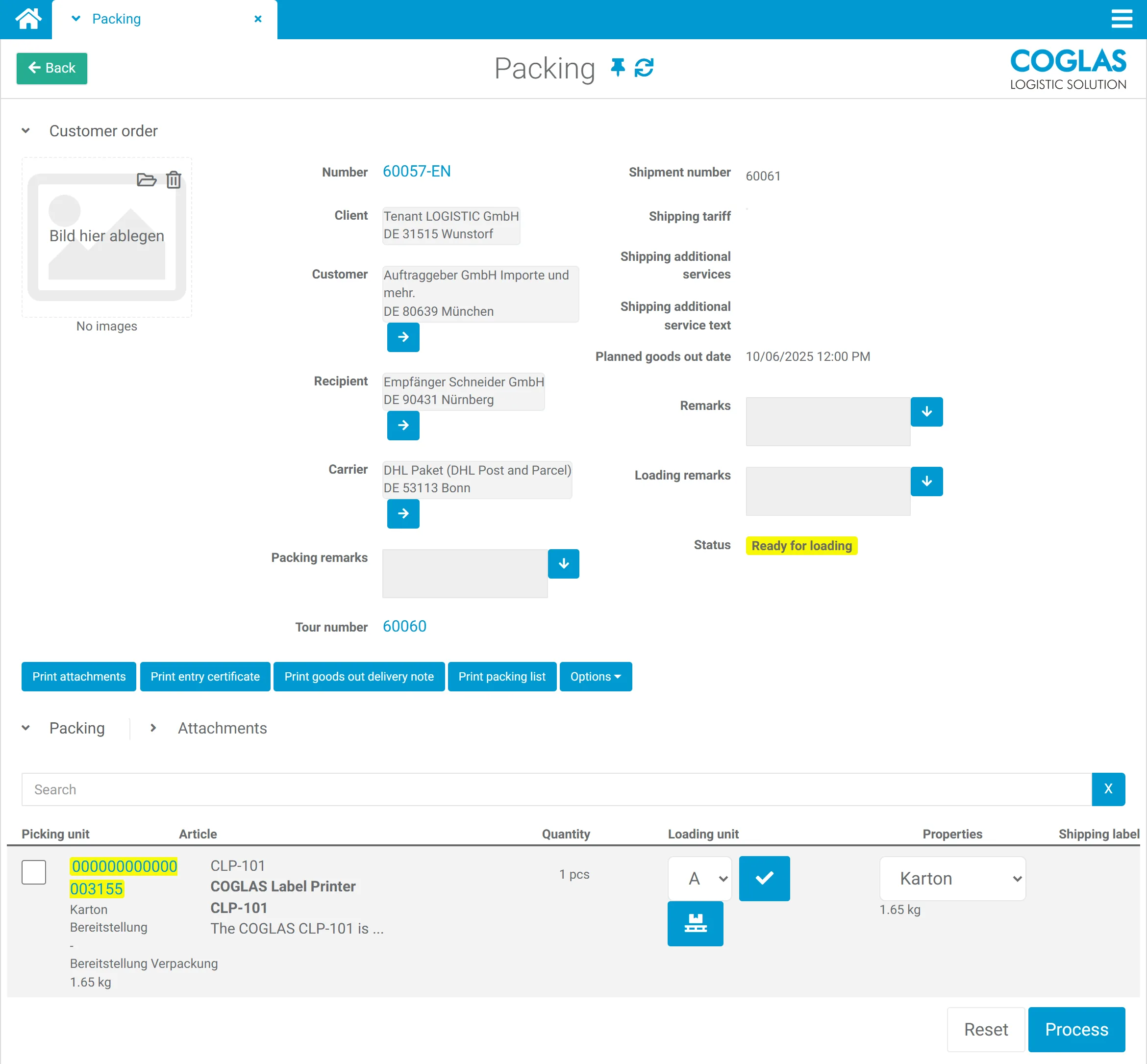
Step by step through the packing process: select an order and distribute the goods across the required cartons or pallets.
Process
Warehouse shipping in the WMS: connect carriers, labels and status cleanly
Shipping quickly becomes expensive when labels, portals, packing data and status updates run separately. COGLAS WEB WMS connects outbound handling and the carrier process into one traceable flow.
COGLAS WEB WMS Connects to your system Standard processes at go-live
Process logic
warehouse shipping: connect status, data and next steps
Shipping in the WMS connects packing, shipping methods, carrier labels, tracking numbers and status updates. The packing cockpit in COGLAS WEB WMS guides you step by step through the packing process, uses an automatic quantity check to ensure completeness, groups shipments by tours and carriers, and secures the correct allocation of deliveries with a loading scan; shipping documents and labels are printed directly. Carriers and parcel/CEP providers are integrated, and status updates flow back to the ERP, shop or SAP. Entry starts at €490/month; with a suitable scope, go-live is possible in a few days.
The automatic quantity check makes sure the delivery is complete.
Bundle orders sensibly by tours and carriers; shipment pre-planning is possible.
Shipments can be structured by tour, carrier and status before loading; tracking and status data stay connected.
Operational signals
Why shipping without a WMS slows you down
COGLAS WEB WMS surfaces disruptions, status and open steps early so warehouse teams don't have to fix things after the fact.
01
Too many shipping portals
Shipping labels are generated separately, data is maintained multiple times and status has to be looked up after the fact.
02
Packing data is missing
Weight, contents, parcel or load carrier are not reliably linked to the order.
03
Tracking arrives too late
The shop, ERP or customer service team has no current shipment status.
04
Switching carriers takes effort
New carriers turn into a manual project when integrations are missing.
Guided flow
COGLAS shipping features
Every step produces useful data for inventory, status, follow-on processes and leading systems.
- 01
Packing cockpit
Step by step through the packing process: select an order and distribute the goods across the required cartons or pallets.
- 02
Ensure completeness
The automatic quantity check makes sure the delivery is complete.
- 03
Group by tours
Bundle orders sensibly by tours and carriers; shipment pre-planning is possible.
- 04
Pre-plan and track shipments
Shipments can be structured by tour, carrier and status before loading; tracking and status data stay connected.
- 05
Print documents and labels
Print delivery notes, packing lists, freight documents and shipping labels with a mouse click directly from the cockpit.
- 06
Loading scan and status update
The final loading scan secures the correct allocation of deliveries; tracking numbers and status data flow to the shop, ERP or SAP.
Comparison
Shipping portal or WMS-integrated shipping?
| Topic | Separate shipping portal | COGLAS WEB WMS |
|---|---|---|
| Data | transferred manually | usable from the order and packing process |
| Label | generated separately | triggered within the process |
| Status | looked up after the fact | reported back to shop/ERP/SAP |
| Errors | noticed late | visible during outbound handling |
COGLAS ist ein guter Fit, wenn
- several carriers or parcel/CEP providers are used.
- the shop, ERP or SAP need tracking and shipping status.
- packing data, labels and outbound handling should be connected.
COGLAS ist kein guter Fit, wenn
- shipping is only occasional and handled manually.
FAQ
Frequently asked questions
What is a carrier integration in a WMS?
A carrier integration connects the warehouse management system (WMS) with carriers so that labels, shipment data, tracking and status do not have to be maintained manually in separate portals. Für Lagerleitung, IT und Operations ist das relevant, wenn das Thema operative Lagerprozesse, Systeme und Verantwortlichkeiten im Tagesgeschäft beeinflusst.
Can COGLAS work with DHL, DPD or UPS?
COGLAS connects carrier and parcel/CEP processes via suitable integrations. Which providers and data fields are relevant is clarified in the integration check. Für Lagerleitung, IT und Operations ist das relevant, wenn das Thema operative Lagerprozesse, Systeme und Verantwortlichkeiten im Tagesgeschäft beeinflusst.
What is the packing cockpit?
The packing cockpit guides you step by step through the packing process, distributes goods across cartons or pallets and ensures completeness with an automatic quantity check. The final loading scan secures the correct allocation of deliveries. Für Lagerleitung, IT und Operations ist das relevant, wenn das Thema operative Lagerprozesse, Systeme und Verantwortlichkeiten im Tagesgeschäft beeinflusst.
When is shipping in the WMS worthwhile?
Shipping in the WMS is worthwhile when packing data, labels, tracking and ERP or shop status updates are regularly handled manually. Für Lagerleitung, IT und Operations ist das relevant, wenn das Thema operative Lagerprozesse, Systeme und Verantwortlichkeiten im Tagesgeschäft beeinflusst.
Can COGLAS include scales and packing data in shipping?
Yes. Parcels, weights and shipping data can be included in the shipping process. Which scales, labels and carrier data are actually integrated is reviewed in the integration check. Für Lagerleitung, IT und Operations ist das relevant, wenn das Thema operative Lagerprozesse, Systeme und Verantwortlichkeiten im Tagesgeschäft beeinflusst.
Still open questions? Talk to our team →
Product tour
See this process in the product tour
Jump straight to the matching COGLAS view for Shipping. You will see the screenshot, hotspots and the key process highlights without a form barrier.
Warehouse and logistics teams rely on COGLAS WEB WMS
















Next step
See live whether COGLAS fits warehouse shipping
The demo focuses on process scope, system landscape, data quality and integrations. That quickly makes clear which starting scope makes sense.