
COGLAS directs staff on the mobile device via the shortest route to the item and cuts picking time.
Process
Run picking digitally and reduce picking errors
Picking is often the most visible bottleneck in the warehouse. COGLAS WEB WMS guides staff through the picking process on mobile devices, cuts search time and delivers clear status updates through to shipping.
COGLAS WEB WMS Connects to your system Standard processes at go-live
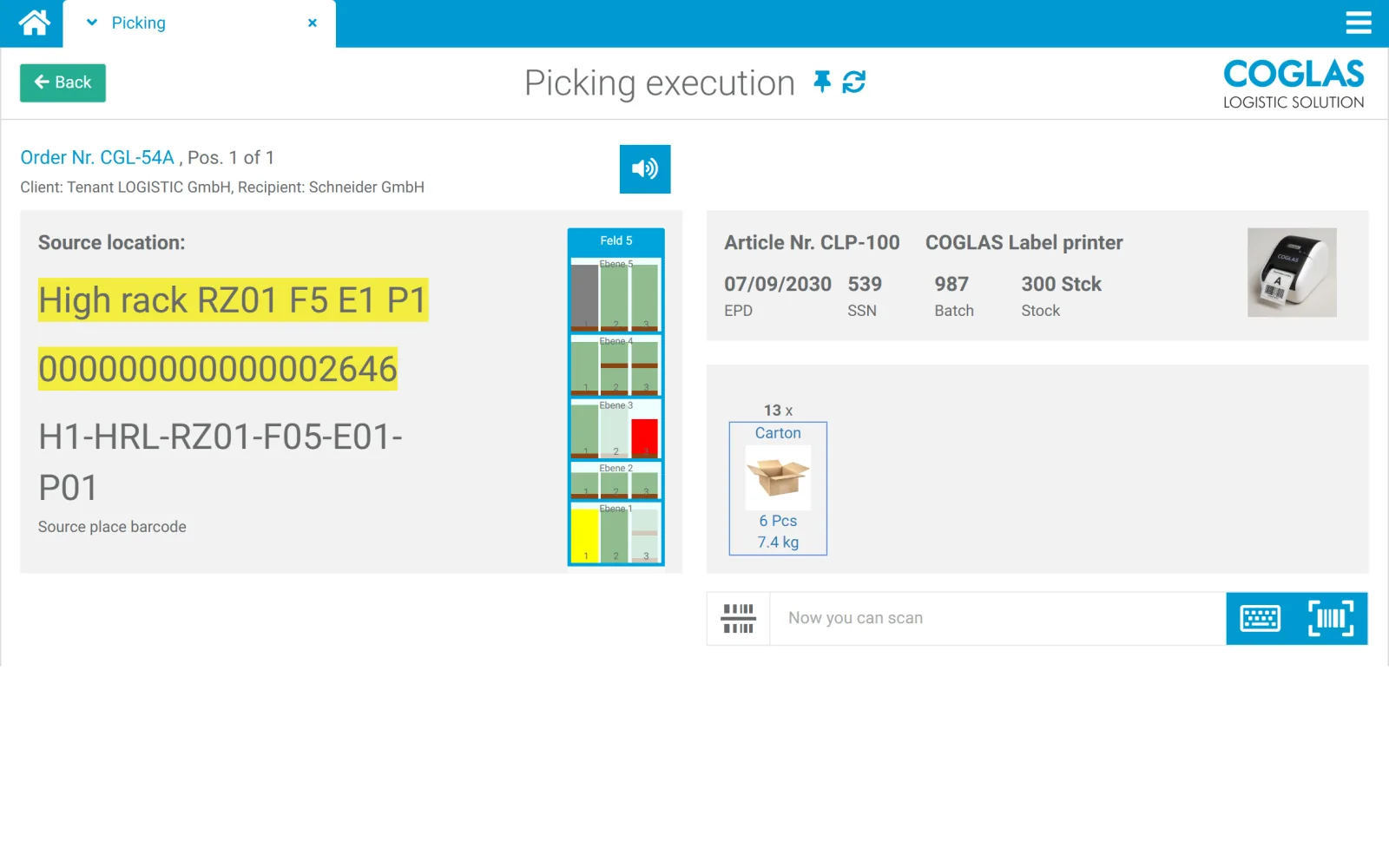
Process logic
picking process: connect status, data and next steps
WMS-driven picking guides staff via mobile device on the shortest route to the storage location and checks every pick against the order. COGLAS WEB WMS supports single, multi-order and wave picking / multi-stage picking, barcode scanning with error control, pick, pack, ship, and outbound movement by FIFO/LIFO, and reports status back to the ERP, shop or shipping system. Entry starts at €490/month; with a suitable scope, go-live is possible within a few days.
At the destination the barcode is scanned; the system checks the item number against the order and shows an error message on any mismatch. Completion is only possible with the correct goods.
Pick one or multiple orders at the same time without mixing deliveries; the picking units are calculated automatically.
Bundle orders into waves and process them in multiple stages, e.g. with subsequent consolidation; alternative depending on setup: pick, pack, ship in one guided flow.
Operational signals
Typical problems in the picking process
COGLAS WEB WMS surfaces disruptions, status and open steps early so warehouse teams don't have to fix things after the fact.
01
Picking errors
Wrong item, wrong quantity or wrong storage location lead to returns and rework.
02
Long travel paths
Orders are not sensibly bundled or processed in an efficient sequence.
03
Paper lists
Printed lists are quickly outdated and provide no direct feedback.
04
Unclear priorities
Urgent orders, partial deliveries and shipping deadlines are not clearly visible in the warehouse.
Guided flow
COGLAS features for picking processes
Every step produces useful data for inventory, status, follow-on processes and leading systems.
- 01
Guide staff to the storage location by smartphone
COGLAS directs staff on the mobile device via the shortest route to the item and cuts picking time.
- 02
Scan the barcode and verify
At the destination the barcode is scanned; the system checks the item number against the order and shows an error message on any mismatch. Completion is only possible with the correct goods.
- 03
Single and multi-order picking
Pick one or multiple orders at the same time without mixing deliveries; the picking units are calculated automatically.
- 04
Wave picking / multi-stage picking
Bundle orders into waves and process them in multiple stages, e.g. with subsequent consolidation; alternative depending on setup: pick, pack, ship in one guided flow.
- 05
FIFO/LIFO, batches and best-before dates
Outbound movement based on the stored strategy (e.g. FIFO/LIFO); take batches, best-before dates, serial numbers and special stock indicators into account.
- 06
Prepare shipping
Hand over pick completion, packing process and outbound handling cleanly.
Criteria
What matters in picking software
Error control
Which items, locations, batches or serial numbers need to be scanned?
Picking strategy
Choose single-order, batch, zone or multi-order picking to fit the operation.
System integration
The ERP, shop and shipping systems need to know which order is at which status.
Ergonomics
Dialogues need to be easy to understand in the warehouse, including for new staff.
Comparison
Picking: manual vs. WMS-guided
| Topic | Manual | COGLAS WEB WMS |
|---|---|---|
| Pick list | Paper or export | digital order with status |
| Route guidance | Experience-based | smartphone guidance on the shortest route |
| Error control | Visual check | barcode match of item number vs. order |
| Multiple orders | manually separated | single and multi-pick without mixing |
| Feedback | after the fact | directly to stock, order and shipping |
COGLAS ist ein guter Fit, wenn
- picking errors, search time or travel paths are noticeably slowing you down.
- shop, ERP or shipping status needs to be up to date.
- mobile guidance in the warehouse is wanted.
- multiple picking strategies or growing order volumes are relevant.
COGLAS ist kein guter Fit, wenn
- picking happens only very rarely.
- no storage locations, scans or order priorities are needed.
- a simple paper list is enough for the long term.
FAQ
Frequently asked questions
How does COGLAS prevent mispicks in the picking process?
On confirmation, COGLAS WEB WMS matches the scanned item number against the order number. On a mismatch an error message appears, and the order can only be completed with the correct goods, reducing complaints and returns. Für Lagerleitung, IT und Operations ist das relevant, wenn das Thema operative Lagerprozesse, Systeme und Verantwortlichkeiten im Tagesgeschäft beeinflusst.
Does COGLAS support multi-order picking?
Yes. COGLAS supports single and multi-pick: multiple orders are picked at the same time without being mixed, and the picking units to be packed are calculated automatically by the system. Für Lagerleitung, IT und Operations ist das relevant, wenn das Thema operative Lagerprozesse, Systeme und Verantwortlichkeiten im Tagesgeschäft beeinflusst.
Does COGLAS support wave picking or pick, pack, ship?
Yes. COGLAS WEB WMS supports wave picking / multi-stage picking, where orders are bundled and then consolidated, as well as pick, pack, ship in one continuous flow. A simple voice output is optionally available; confirmations still run via scan. Für Lagerleitung, IT und Operations ist das relevant, wenn das Thema operative Lagerprozesse, Systeme und Verantwortlichkeiten im Tagesgeschäft beeinflusst.
Does picking require dedicated scanners?
A smartphone or tablet is sufficient for order processing and barcode scanning. Which device and process logic fits best is clarified in the quick check. Für Lagerleitung, IT und Operations ist das relevant, wenn das Thema operative Lagerprozesse, Systeme und Verantwortlichkeiten im Tagesgeschäft beeinflusst.
Still open questions? Talk to our team →
Product tour
See this process in the product tour
Jump straight to the matching COGLAS view for Picking. You will see the screenshot, hotspots and the key process highlights without a form barrier.
Warehouse and logistics teams rely on COGLAS WEB WMS













Next step
See live whether COGLAS fits picking process
The demo focuses on process scope, system landscape, data quality and integrations. That quickly makes clear which starting scope makes sense.