
Use order management to drive stock removal from inventory and reserve the required quantities.
Process
Manage outbound handling digitally: check, pack, stage
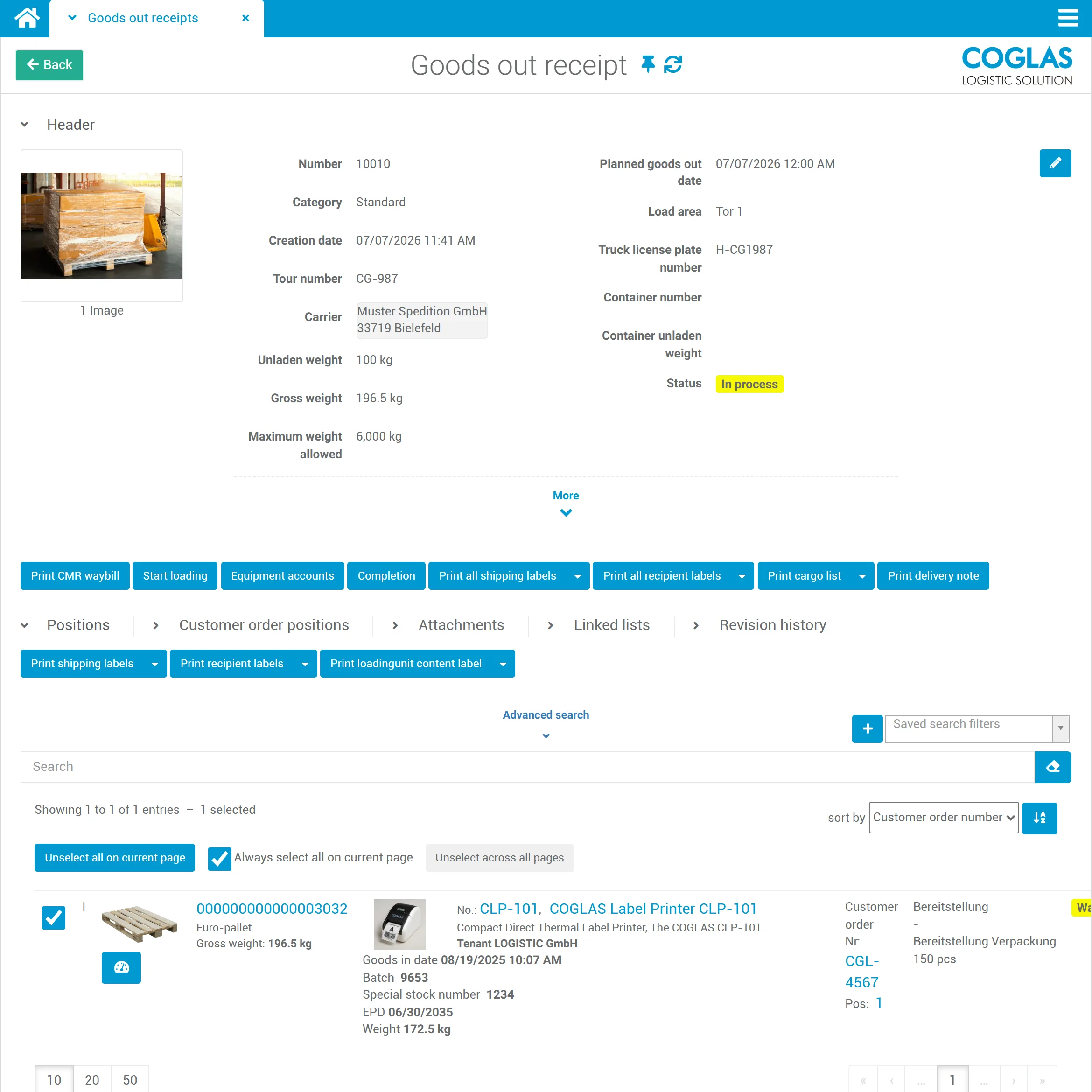
Outbound handling is where it is decided whether an order is correct, complete and ready to ship. COGLAS WEB WMS connects picking, packing, staging and shipping status.
COGLAS WEB WMS Connects to your system Standard processes at go-live
Process logic
outbound handling: connect status, data and next steps
Outbound handling in a WMS covers order management, reservation, checking, packing, staging, loading, carrier handover and status updates. In COGLAS WEB WMS, customer orders drive stock removal; reservations, the loading process with weight restrictions and outbound documents are built in, and the status flows back to ERP, shop or SAP. The entry-level pricing starts at €490/month; with the right scope, go-live in a few days is possible.
Check picked line items against the order and quantity; capture packages, weights and load carriers.
Stage orders by tour, carrier or date; manage pre-picking and loading while taking weight restrictions into account.
Load carriers, hazardous goods points and weight restrictions are considered throughout the process, so staging and loading do not have to be corrected late.
Operational signals
Bottlenecks before shipping
COGLAS WEB WMS surfaces disruptions, status and open steps early so warehouse teams don't have to fix things after the fact.
01
Orders are not complete
Missing line items only surface at the packing station or during shipping.
02
Packing rules are missing
Staff decide manually how goods are packed, consolidated or staged.
03
Status remains unclear
ERP, shop or customer cannot reliably tell whether an order is packed or ready to ship.
04
Carrier process stalls
When shipping data is missing, manual rework and delays follow.
Guided flow
Outbound handling with COGLAS
Every step produces useful data for inventory, status, follow-on processes and leading systems.
- 01
Customer order and reservation
Use order management to drive stock removal from inventory and reserve the required quantities.
- 02
Pick completion and packing
Check picked line items against the order and quantity; capture packages, weights and load carriers.
- 03
Staging and loading
Stage orders by tour, carrier or date; manage pre-picking and loading while taking weight restrictions into account.
- 04
Secure hazardous goods, load carriers and weights
Load carriers, hazardous goods points and weight restrictions are considered throughout the process, so staging and loading do not have to be corrected late.
- 05
Documents and handover
Generate outbound documents and hand shipment data, shipping labels and status over to carrier and ERP processes.
Criteria
What matters in outbound handling
Packing logic
Which items need special packaging, checks or documents?
Status logic
Which systems need to receive packing, staging or shipping status?
Carrier fit
Which carriers, shipping labels and shipment data are relevant?
Error control
Which scans or checks prevent incorrect shipments?
Comparison
Outbound handling without system breaks
| Topic | Manual | COGLAS WEB WMS |
|---|---|---|
| Packing | based on experience | guided packing process |
| Status | maintained after the fact | visible directly in the process |
| Shipping | separate portals | carrier integration available |
| Status update | delayed | reported back to ERP, shop or SAP |
COGLAS ist ein guter Fit, wenn
- packing, checking or staging processes are error-prone.
- carrier, shop or ERP need up-to-date shipping status.
- several shipping types, packages or customer requirements are relevant.
COGLAS ist kein guter Fit, wenn
- outbound handling only happens occasionally and without process pressure.
- no packing logic, no status updates and no carrier integration are needed.
FAQ
Frequently asked questions
What is outbound handling in a WMS?
Outbound handling covers the steps after picking: checking, packing, consolidating, staging, carrier handover and status updates. Für Lagerleitung, IT und Operations ist das relevant, wenn das Thema operative Lagerprozesse, Systeme und Verantwortlichkeiten im Tagesgeschäft beeinflusst. COGLAS WEB WMS wird im Fit-Check auf Nutzerzahl, Module, Datenqualität, Startumfang und Schnittstellen wie SAP, ERP, Shop, Carrier oder Lagerhardware geprüft.
How does outbound handling relate to shipping?
Outbound handling ensures the order is packed correctly and staged. Shipping then generates and hands over shipment data, shipping labels and carrier status. Für Lagerleitung, IT und Operations ist das relevant, wenn das Thema operative Lagerprozesse, Systeme und Verantwortlichkeiten im Tagesgeschäft beeinflusst.
Can COGLAS report shipping status back?
Yes, if the appropriate integrations are defined, status information can be returned to ERP, shop, SAP or carrier processes. Für Lagerleitung, IT und Operations ist das relevant, wenn das Thema operative Lagerprozesse, Systeme und Verantwortlichkeiten im Tagesgeschäft beeinflusst. COGLAS WEB WMS wird im Fit-Check auf Nutzerzahl, Module, Datenqualität, Startumfang und Schnittstellen wie SAP, ERP, Shop, Carrier oder Lagerhardware geprüft.
Does COGLAS drive stock removal via customer orders?
Yes. Through the integrated order management, customer orders drive stock removal from the warehouse; reservations and the loading process are part of outbound handling. Für Lagerleitung, IT und Operations ist das relevant, wenn das Thema operative Lagerprozesse, Systeme und Verantwortlichkeiten im Tagesgeschäft beeinflusst.
Still open questions? Talk to our team →
Product tour
See this process in the product tour
Jump straight to the matching COGLAS view for Outbound handling and shipping. You will see the screenshot, hotspots and the key process highlights without a form barrier.
Warehouse and logistics teams rely on COGLAS WEB WMS

















Next step
See live whether COGLAS fits outbound handling
The demo focuses on process scope, system landscape, data quality and integrations. That quickly makes clear which starting scope makes sense.