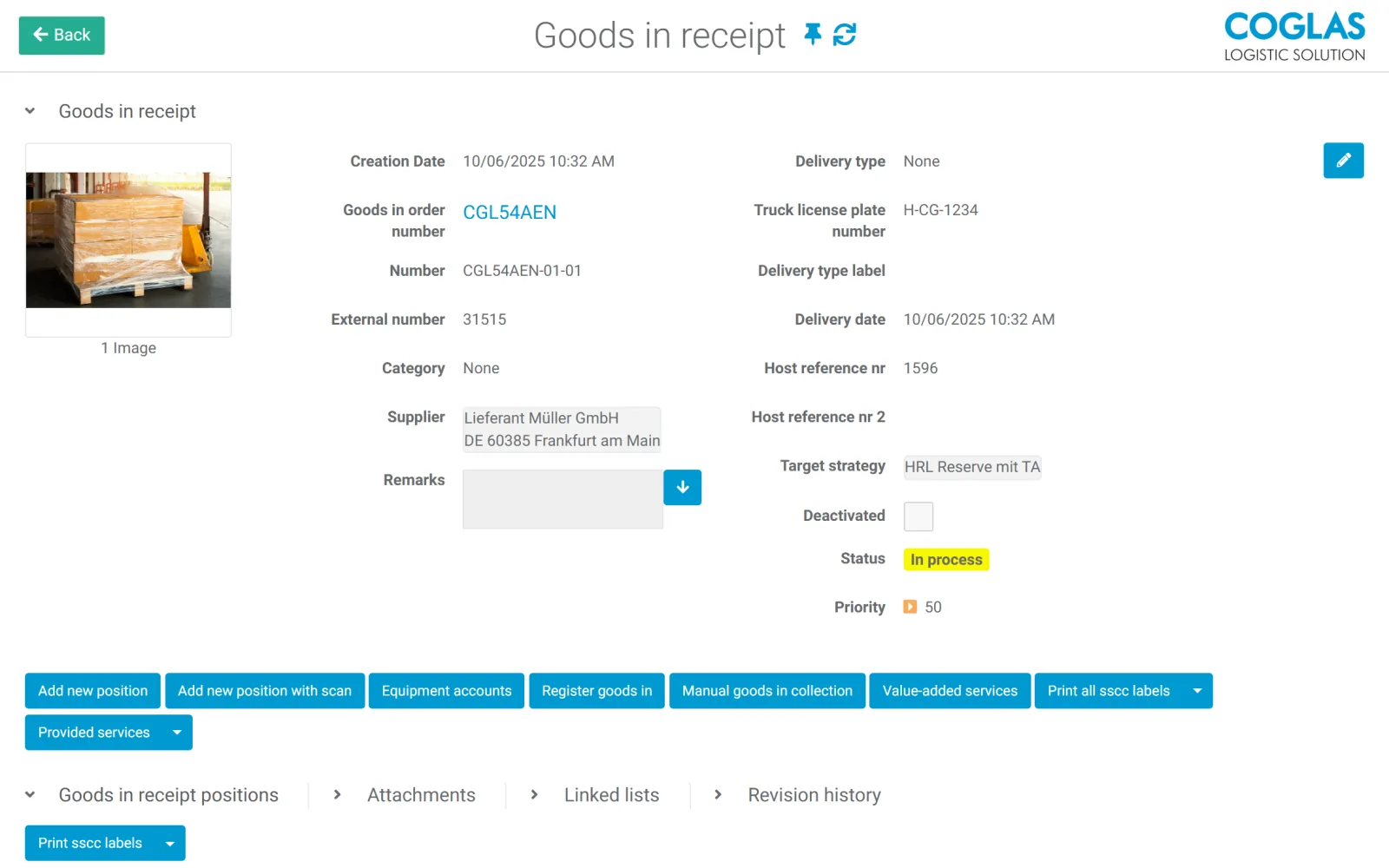
Goods receipt with purchase order reference and advance shipping notice, or manually as an unplanned goods receipt. In the capture cockpit, article data and product images are directly visible.
Process
Manage goods receipt digitally: from ASN to put-away
Goods receipt determines whether stock levels stay accurate later on. COGLAS WEB WMS structures acceptance, inspection, booking and put-away so that downstream processes never start with the wrong data.
COGLAS WEB WMS Connects to your system Standard processes at go-live
Process logic
goods receipt process: connect status, data and next steps
A digital goods receipt process connects advance shipping notices, delivery notes, purchase orders, quality checks, labeling, stock booking and put-away. COGLAS WEB WMS supports both planned goods receipt (with purchase order reference and ASN) and unplanned goods receipt, runs the quality check through digital checklists with photo documentation, handles blocked stock and cross-docking, and sends feedback to SAP, ERP or other leading systems. Entry starts on demand from €490/month; with a suitable scope, go-live is possible within a few days.
Document over-deliveries, short deliveries or incorrect deliveries and trigger follow-up actions.
Work through digital inspection checklists, photograph the article condition on a mobile device and transfer damaged goods into blocked stock.
Delivery notes, inspection requirements and photos are documented directly on the transaction so that discrepancies do not surface only in downstream processes.
Operational signals
Typical bottlenecks in goods receipt
COGLAS WEB WMS surfaces disruptions, status and open steps early so warehouse teams don't have to fix things after the fact.
01
Stock levels become visible too late
The goods are physically on site, but not yet correctly available in the system. Sales, replenishment and planning then work with outdated figures, and downstream processes start on the wrong basis.
02
Delivery note and delivered goods do not match
Discrepancies between delivery note and purchase order are often the norm rather than an exception. They need to be documented and prepared for downstream processes instead of being clarified manually every time.
03
Quality check and blocked stock are missing
Blocked, damaged or inspection-required goods end up in free stock too quickly. Without a defined blocked and inspection status, they get picked by mistake and have to be retrieved with significant effort later on.
04
Labels and storage locations are unclear
Without clear labeling, search times and incorrect put-aways build up. New team members take longer to get up to speed, and stock is hard to assign clearly to a storage location.
Guided flow
How COGLAS runs your goods receipt
Every step produces useful data for inventory, status, follow-on processes and leading systems.
- 01
Capture planned or unplanned receipts
Goods receipt with purchase order reference and advance shipping notice, or manually as an unplanned goods receipt. In the capture cockpit, article data and product images are directly visible.
- 02
Check quantities and discrepancies
Document over-deliveries, short deliveries or incorrect deliveries and trigger follow-up actions.
- 03
Inspect with a checklist (QC)
Work through digital inspection checklists, photograph the article condition on a mobile device and transfer damaged goods into blocked stock.
- 04
Delivery instructions and documentation
Delivery notes, inspection requirements and photos are documented directly on the transaction so that discrepancies do not surface only in downstream processes.
- 05
Put away or cross-dock
Suggest storage locations and generate stock labels, or route urgent goods directly from goods receipt to shipping (cross-docking).
- 06
Downstream processes and feedback
Trigger transport to the target storage location or to production and feed stock, status and discrepancies back to ERP/SAP.
Criteria
What matters in the goods receipt process
Data source
Does goods receipt come from ERP, SAP, shop, advance shipping notice or manual capture?
Inspection requirement
Which articles require quality checks, best-before dates, batches, serial numbers or blocked stock?
Put-away logic
Which storage locations are suitable and which rules apply per article?
Feedback
Which data does ERP or SAP need to receive immediately?
Comparison
Goods receipt without a WMS vs. with COGLAS
| Topic | Manual / ERP list | COGLAS WEB WMS |
|---|---|---|
| Delivery | Paper, Excel or ERP form | Guided goods receipt with line items |
| Discrepancy | Clarified after the fact | Documented and reported directly |
| Stock | Visible with delay | Current and traceable after booking |
| Put-away | Based on tacit knowledge | Guided location logic and labels |
COGLAS ist ein guter Fit, wenn
- Goods receipts are frequently checked or captured manually after the fact.
- Stock levels need to become visible faster and more reliably.
- SAP or ERP needs to be updated with status and discrepancies.
- Quality checks, batches, best-before dates or blocked stock are relevant.
COGLAS ist kein guter Fit, wenn
- Goods receipts are very rare and do not require storage location logic.
- Only a simple delivery note filing is required.
FAQ
Frequently asked questions
What belongs to goods receipt in a WMS?
Goods receipt covers ASN, delivery note, purchase order, quantity check, quality check, labeling, stock booking, put-away and feedback to ERP or SAP. Für Lagerleitung, IT und Operations ist das relevant, wenn das Thema operative Lagerprozesse, Systeme und Verantwortlichkeiten im Tagesgeschäft beeinflusst.
Can COGLAS capture discrepancies during goods receipt?
Yes. Discrepancies in quantity, article, status or quality can be documented within the process and made available for downstream processes or integrations. Für Lagerleitung, IT und Operations ist das relevant, wenn das Thema operative Lagerprozesse, Systeme und Verantwortlichkeiten im Tagesgeschäft beeinflusst.
Does COGLAS support cross-docking?
Yes. Urgently needed articles can be routed directly from goods receipt to shipping without the detour via put-away. Für Lagerleitung, IT und Operations ist das relevant, wenn das Thema operative Lagerprozesse, Systeme und Verantwortlichkeiten im Tagesgeschäft beeinflusst. COGLAS WEB WMS wird im Fit-Check auf Nutzerzahl, Module, Datenqualität, Startumfang und Schnittstellen wie SAP, ERP, Shop, Carrier oder Lagerhardware geprüft.
How does COGLAS secure the quality check during goods receipt?
Through digital checklists that each user confirms step by step. The article condition can be photographed with a mobile device and uploaded to the system; damaged goods are transferred into blocked stock. Für Lagerleitung, IT und Operations ist das relevant, wenn das Thema operative Lagerprozesse, Systeme und Verantwortlichkeiten im Tagesgeschäft beeinflusst.
How quickly can goods receipt go digital?
With a clearly scoped process, go-live is possible within a few days. Integrations, labels and special inspections are prioritized beforehand. Für Lagerleitung, IT und Operations ist das relevant, wenn das Thema operative Lagerprozesse, Systeme und Verantwortlichkeiten im Tagesgeschäft beeinflusst. COGLAS WEB WMS wird im Fit-Check auf Nutzerzahl, Module, Datenqualität, Startumfang und Schnittstellen wie SAP, ERP, Shop, Carrier oder Lagerhardware geprüft.
Still open questions? Talk to our team →
Product tour
See this process in the product tour
Jump straight to the matching COGLAS view for Goods receipt. You will see the screenshot, hotspots and the key process highlights without a form barrier.
Warehouse and logistics teams rely on COGLAS WEB WMS








Next step
See live whether COGLAS fits goods receipt process
The demo focuses on process scope, system landscape, data quality and integrations. That quickly makes clear which starting scope makes sense.